


Page Ref Code: D154992
Lenovo ThinkEdge SE30 Edge Computer Upgrades - Kingston Memory & SSDs
Filters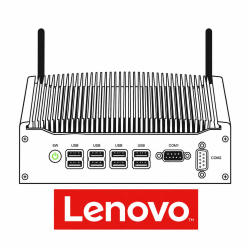
| Device Specifications | |
|---|---|
| Maximum Memory | Not Possible To Upgrade The Memory |
| Maximum Memory Per Slot | Not Possible To Upgrade The Memory |
| Number Of Memory Sockets | 0 Memory Slots To Upgrade |
| Device Specifications | |
|---|---|
| Make & Model: | Lenovo ThinkEdge SE30 |
| Device Type: | Edge Computer |
| Memory Ram Type | 0 Memory Slots To Upgrade |
| Memory Speed | 0 Memory Slots To Upgrade |
| Number Of Memory Sockets | 0 Memory Slots To Upgrade |
| Maximum Memory | Not Possible To Upgrade The Memory |
| Maximum Memory Per Slot | Not Possible To Upgrade The Memory |
| SSD Form Factor | M.2 (2230) |
| SSD Interface | PCIe NVMe Gen 4.0 (x4) |
| Lenovo Support: | http://support.lenovo.com/en_GB/ |
Compatible Kingston NV3 M.2 NVMe [2230] SSDs


£440.49 (inc. VAT)
£367.08 (ex. VAT)
Includes Free Delivery To UK
Want it despatched tomorrow?
Order within 17hrs 3mins


£234.02 (inc. VAT)
£195.02 (ex. VAT)
Includes Free Delivery To UK
Want it despatched tomorrow?
Order within 17hrs 3mins


£148.96 (inc. VAT)
£124.13 (ex. VAT)
Includes Free Delivery To UK
Want it despatched tomorrow?
Order within 17hrs 3mins
Delivery Costs
KingstonMemoryShop despatch times:
| Day/Time Of Order | Same Day Despatch | Expected Despatch Date |
| Monday-Friday (Up to 4pm) | Yes. | Same day. |
| Monday-Friday (After 4pm) | No. | Next working day. If ordered after 4pm on a Friday the despatch date will be the following Monday (excluding public holidays). |
| Saturday-Sunday | N/A. | The following Monday excluding public holidays. |
Please note, same day despatch applies to SKUs showing as in stock only, on the product page and through checkout. SKUs not currently in stock are available to order, and will show an estimated delivery date on the product page and through checkout.
United Kingdom (Inc Channel Islands);
Next Working Day (Royal Mail Guaranteed Next Working) - £7.99.
Tracked24 (Royal Mail Estimated Next Working Day) - £4.99.
Tracked48 (Royal Mail Estimated Two Working Days) - £3.99.
Economy (Royal Mail Estimated 3-5 working days) - £FREE.
Express Courier (FedEx) - £6.99.