


AI Server Hardware Guide: RAM, SSDs, GPUs & CPUs
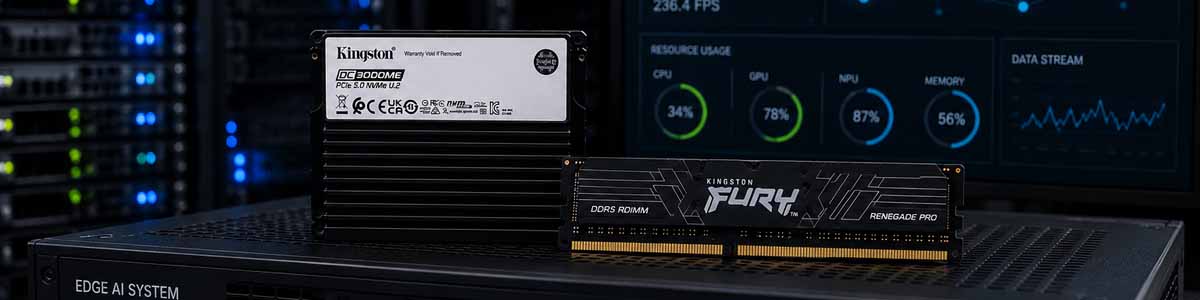
AI Server Hardware Guide: Choosing Memory, Storage, GPUs and Processors
Artificial intelligence is changing the way organisations analyse data, automate processes, develop software and deliver digital services. However, AI workloads can place exceptional demands on server hardware. Large datasets, complex models and sustained processing requirements mean that a conventional server configuration may not provide the capacity, speed or reliability required for effective AI development.
A well-designed AI server must balance processor performance, GPU acceleration, system memory, storage capacity, storage endurance, networking and cooling. Concentrating on only one component can create bottlenecks elsewhere in the system. A powerful GPU, for example, may remain underused if the server does not have enough system memory or if the storage platform cannot deliver training data quickly enough.
This guide explains the main components of an AI server and how to choose suitable hardware for machine learning, generative AI, inference, model training, data preparation and high-performance computing. It also examines the role of Kingston Server Memory and Kingston SSD Storage in building a reliable and scalable AI platform.
What Is an AI Server?
An AI server is a high-performance system designed to process workloads associated with artificial intelligence and machine learning. These workloads can include training neural networks, running large language models, processing images and video, analysing scientific data, supporting recommendation engines and delivering real-time inference.
Unlike a standard office server, an AI server will often contain one or more high-performance GPUs, large amounts of ECC memory and several high-speed SSDs. Enterprise configurations may also use multiple processors, specialised accelerators, high-bandwidth networking and storage arrays designed for continuous operation.
AI servers can range from compact workstation-class systems used for local model development to multi-GPU servers installed in data centres.
The Core Components of an AI Server
Every component within an AI server contributes to overall performance. Processor resources, GPU acceleration, system memory and storage should therefore be considered together rather than treated as independent purchasing decisions.
CPU
The central processing unit manages the operating system, application logic, data preparation and many tasks that are not transferred to a GPU. AI training is commonly associated with GPU acceleration, but the CPU remains essential for loading data, preprocessing information, managing storage operations and coordinating multiple accelerators.
Core count is important for parallel tasks, while processor architecture, clock speed, memory channel support and PCIe connectivity can influence the performance of the entire platform. Dual-socket servers may provide additional processor cores, memory channels and PCIe lanes, making them attractive for highly scalable AI systems.
GPU and AI Accelerators
GPUs are designed to perform large numbers of calculations simultaneously, making them highly effective for the matrix operations used in machine learning. GPU memory, normally referred to as VRAM, stores active model data and working information during processing.
A larger model generally requires more GPU memory. If a model does not fit within the available VRAM, it may need to be divided across multiple GPUs or partially offloaded into system memory. This makes the relationship between GPU capacity and system RAM increasingly important.
When selecting GPUs, consider VRAM capacity, supported numerical formats, software compatibility, thermal design, power requirements and available PCIe connectivity. Multi-GPU systems must also provide enough physical space, power delivery and cooling capacity.
System Memory
System memory is one of the most important parts of an AI server. RAM can hold datasets, application processes, virtual machines, model checkpoints and information being prepared for GPU processing. Insufficient memory can force the server to use SSD storage as temporary memory, which can significantly reduce performance.
Modern AI servers commonly use DDR5 ECC Registered DIMMs because they provide high capacities, error correction and support for multi-channel server architectures. Kingston Server Premier memory is designed for compatible server and workstation platforms where dependable operation and consistent specifications are important.
Storage
AI storage must provide more than capacity alone. Training datasets can contain millions of files, large video collections, image libraries, databases and model checkpoints. Slow storage can delay data preparation and prevent GPUs from receiving information quickly enough.
Enterprise SSDs are particularly suited to demanding server environments because they are designed around sustained workloads, predictable latency, endurance and continuous operation. Depending on the platform, Kingston enterprise SSD solutions can be used for operating systems, active datasets, databases, model storage, caching and high-performance scratch space.
Modern enterprise NVMe drives can deliver extremely high throughput. For example, Kingston's DC3000ME range includes PCIe 5.0 NVMe enterprise SSDs intended for data-intensive server and data-centre applications.
Networking
Networking becomes increasingly important when datasets are stored centrally or several AI servers operate together. A slow network can restrict access to shared storage and reduce the efficiency of distributed processing. Higher-speed Ethernet or specialised interconnects may therefore be required for clusters, shared storage platforms and multi-node AI environments.
Why ECC Memory Matters for AI Servers
Error Correcting Code memory can detect and correct certain memory errors before they affect the operating system or application. This is particularly valuable in AI servers because training jobs may run for many hours or days. A memory-related error during a long training process could lead to corrupted results, application instability or lost processing time.
ECC memory can be especially important in scientific, financial, medical, engineering and enterprise environments where data integrity matters. DDR5 ECC RDIMMs also allow compatible server platforms to support much larger memory configurations than typical consumer desktop systems.
Kingston Server Premier memory provides server-grade memory options for supported platforms. When upgrading, memory generation, speed, rank, capacity, module organisation and processor compatibility should all be checked. Registered, unbuffered and load-reduced memory technologies must not be mixed unless the platform manufacturer explicitly supports the configuration.
Recommended AI Server Memory Capacities
| Installed Memory | Suitable AI Use | Typical Considerations |
|---|---|---|
| 64GB | Entry-level development, small inference projects and testing | Smaller datasets and compact models |
| 128GB | AI development, data preparation and local model deployment | More headroom for larger datasets and multitasking |
| 256GB | Professional AI workstations and small training servers | Larger models, virtual machines and multiple active processes |
| 512GB | Multi-GPU servers, training and data analytics | Large in-memory datasets and more demanding workflows |
| 1TB | Enterprise training, large databases and complex simulation | Suitable where substantial datasets need to remain readily accessible |
| 2TB+ | Large-scale AI, research, virtualisation and data-centre workloads | Requires a platform designed for very high memory capacities |
These capacities are general guidelines rather than fixed requirements. Actual requirements depend on model architecture, dataset size, software, GPU configuration and simultaneous workloads. Memory should also be populated according to the server's available memory channels to avoid unnecessarily reducing memory bandwidth.
Choosing an SSD for AI Workloads
AI storage requirements vary considerably. A server used mainly for inference may need rapid access to model files but relatively little write activity. A training server may repeatedly read datasets while writing logs, temporary data and model checkpoints. Data engineering platforms can combine large sequential transfers with intensive random operations.
When comparing SSDs, consider performance consistency, endurance, latency, power-loss protection, interface and physical form factor. Peak sequential transfer speed can be useful, but it does not provide a complete picture of performance under sustained server workloads.
| SSD Type | Main Advantage | Suitable AI Role |
|---|---|---|
| 2.5-inch SATA SSD | Broad compatibility and cost-effective capacity | Operating systems, archives and secondary datasets |
| M.2 NVMe SSD | Compact size and high performance | Boot drives, applications, local models and workstation storage |
| U.2 / U.3 NVMe SSD | Enterprise NVMe performance with serviceable drive bays | Training datasets, databases, caching and active storage |
| E1.S NVMe SSD | High-density storage designed for modern servers | Data-centre platforms and scalable AI storage |
| E3.S NVMe SSD | High capacity and enterprise performance | Large AI datasets, storage pools and intensive applications |
Browse the wider Kingston SSD range to compare storage options for compatible servers, workstations and professional systems.
Recommended SSD Capacities for AI Servers
| SSD Capacity | Recommended AI Use |
|---|---|
| 960GB | Operating system, applications and smaller AI models |
| 1.92TB | Local development, model libraries and moderate datasets |
| 3.84TB | Professional training data, checkpoints and active project storage |
| 7.68TB | Large datasets, shared AI environments and enterprise applications |
| 15.36TB+ | High-capacity AI servers, analytics platforms and consolidated storage |
Many AI servers use several SSDs rather than relying on one large drive. Separate storage can be allocated to the operating system, active datasets, temporary processing, model checkpoints and longer-term data. RAID may also be used to provide additional performance or resilience, although it should not be considered a replacement for an appropriate backup strategy.
AI Training Servers vs AI Inference Servers
Training and inference place different demands on hardware. Training involves repeatedly processing large datasets and adjusting model parameters. It generally benefits from powerful GPUs, substantial system memory, fast storage and high-capacity cooling.
Inference uses a trained model to generate predictions, classifications, responses or other outputs. Some inference systems can operate effectively with fewer resources, while high-volume services may still require multiple GPUs and significant amounts of system RAM.
A server designed for both training and inference should provide enough memory and storage flexibility to support changing workloads. Spare memory slots, available drive bays and unused PCIe capacity can therefore be extremely valuable when planning for future expansion.
Common AI Server Bottlenecks
AI server performance is frequently limited by a component other than the GPU. Common bottlenecks include insufficient system memory, limited memory bandwidth, slow storage, inadequate PCIe connectivity and restricted network throughput.
If a server regularly runs out of RAM, upgrading its installed memory may allow larger datasets and models to remain active without relying on slower SSD storage. If GPUs spend significant amounts of time waiting for data, faster NVMe storage or improved networking may provide a greater performance improvement than simply adding further compute capacity.
Monitoring CPU utilisation, system memory usage, GPU activity, storage latency and network traffic helps identify the real restriction. AI server upgrades should therefore be based on measured workload behaviour wherever possible.
Planning an AI Server for Future Expansion
AI infrastructure should be planned for growth. Models, datasets and user demand can increase rapidly, meaning a server that is sufficient today could become restrictive in the future.
Choosing a platform with spare memory slots, additional storage bays, sufficient PCIe lanes and suitable power capacity can reduce the cost and disruption associated with later expansion. Large memory configurations also need to be planned carefully because supported memory speeds may vary according to processor generation, DIMM capacity and the number of modules installed per memory channel.
Reliability is equally important. Long-running AI jobs can be disrupted by memory instability, overheating, inadequate power delivery or storage failure. Server-grade components, appropriate airflow, redundant power where required and a robust backup strategy can help protect workloads and valuable datasets.
Choosing Compatible Kingston Memory and SSD Upgrades
Before purchasing an upgrade, confirm the exact server manufacturer, series and model. Servers within the same product family can use different processors, motherboards, memory technologies and storage backplanes.
For memory upgrades, check the supported DDR generation, ECC requirement, registered or load-reduced technology, module capacity, rank and maximum system capacity. Memory should normally be installed in balanced groups according to the processor and memory-channel layout.
For SSD upgrades, confirm the physical form factor, host interface, connector, backplane support and required drive carrier. M.2, SATA, U.2, U.3, E1.S and E3.S drives should not be selected on capacity alone; the complete SSD interface and form factor must be supported by the system.
KingstonMemoryShop allows customers to search for memory and storage upgrades by system model. If you already know the server that is being used for your AI environment, browse Kingston Server Upgrades by Manufacturer and Model to locate compatible options.
Building a Balanced AI Infrastructure Platform
Building an effective AI server requires more than selecting the fastest available GPU. Processor resources, system memory, storage performance, networking, cooling and future expansion must all be considered as part of the same platform.
DDR5 ECC server memory can provide the capacity, bandwidth and reliability required for demanding AI workloads, while high-performance and enterprise SSDs can support sustained access to datasets, applications and model checkpoints. Kingston Server Premier memory and Kingston SSD solutions provide upgrade options across compatible AI servers, data-centre systems and professional workstations.
By matching memory and storage capacity to the intended workload, organisations can reduce bottlenecks, improve system utilisation and create an AI infrastructure platform capable of scaling as models, datasets and computational requirements continue to grow.
Upgrade Your AI Server or Workstation with Kingston Memory
Explore genuine Kingston memory and SSD upgrades for AI servers, professional workstations, machine learning systems and data-intensive computing. Use the links below to browse by upgrade type or locate compatible upgrades for a specific system.
| Kingston Upgrade | Recommended For | Shop / Find Upgrades |
|---|---|---|
| Kingston DDR5 ECC RDIMM | AI servers, machine learning, large datasets, virtualisation and multi-GPU systems | Shop DDR5 ECC RDIMM Memory |
| Kingston Server Memory | DDR5 and DDR4 compatible server memory upgrades | Shop Kingston Server Memory |
| Kingston SSDs | AI datasets, models, applications, scratch storage, servers and workstations | Shop Kingston SSDs |
| Server Upgrades by Model | Finding compatible Kingston RAM and SSD upgrades for an existing AI server | Find Server Upgrades |
| Workstation Upgrades by Model | Local AI development, inference, engineering, data science and content creation | Find Workstation Upgrades |
Compatibility note: Supported memory type, capacity, memory speed, SSD interface and maximum configuration depend on the processor, motherboard, system configuration and manufacturer specification. Always confirm compatibility with the exact server or workstation model before purchasing.